Audience
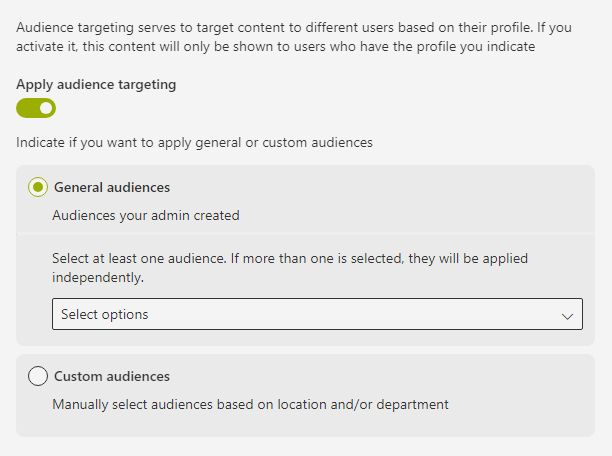
Show the audience selector in the form. This field allows you to select the audience for the content. The audience can be selected from a list of audiences that have been previously configured by an administrator.
Interfaces
export interface IAudienceField extends IBaseField {
  audienceType?: AudienceTypes;
  applyAudienceTargeting?: boolean;
  selectedAudiences?: string[];
  locationField?: ITaxonomyField;
  departmentField?: ITaxonomyField;
}
export interface ITaxonomyField {
name: string;
value?: IKeyText[];
label?: string;
description?: string;
termSetNameOrID: string;
}export enum AudienceTypes {
General = 'general',
Custom = 'custom',
}Example
json
UploadFiles
 {
    "name": "audience",
    "type": "Audience",
    "locationField": {
        "name": "locations",
        "label": {
            "t": "forms.locations"
        },
        "description": {
            "t": "forms.locationsDescription"
        },
        "termSetNameOrID": "b49f64b3-4722-4336-9a5c-56c326b344d4"
    },
    "departmentField": {
        "name": "departments",
        "label": {
            "t": "forms.departments"
        },
        "description": {
            "t": "forms.departmentsDescription"
        },
        "termSetNameOrID": "8ed8c9ea-7052-4c1d-a4d7-b9c10bffea6f"
    }
}
Properties
audienceType
The type of audience to be applied.
-
Type:
AudienceTypes -
Required: No
-
Description: The options are:
General: These are Syntphony audiences, created by the admin.Custom: These are the older audiences categorized by location and department.
applyAudienceTargeting
If true, the audience targeting will be applied.
-
Type:
boolean -
Required: No
selectedAudiences
The audiences that will be selected.
- Type:
string[] - Required: No
locationField
The field that will be used to select the location.
- Type:
ITaxonomyField - Required: No
departmentField
The field that will be used to select the department.
- Type:
ITaxonomyField - Required: No